Showing posts with label technology in maths. Show all posts

teaching online - Issue 4

Synchronous vs Asynchronous

In class, as in face to face, I like to hold the learners hands a bit, in a non touching way! What I mean is, I give them choice but I guide them down a path I have planned for them. I recognise it in my teaching and have reflected on it lots. I struggle to define if it is my teaching style, my subject specific issues or teaching in further education specific. All my learners are resitters, do I know what's best for them? Probably? can I help them? definitely! Should I let go of their hands and give them more freedom? I wish I could but I can't!

Knowing this dilemma I ploughed into my online teaching in a synchronous manner. We sat online for 3 hours together doing maths. Little introduction chat, building community and connection. Retrieval practise task. Me give content input. Them do work. Reflections on that and check progress. Me do input, they do work etc etc. Openly admitting this may not be the best approach but it was successful in terms of progress of my learners. They progressed through the lesson like superstars. Did they enjoy themselves? Some did because of their success. (yes I asked them, I ask them a lot of questions to learn more about their experiences!) some didn't because it was exhausting. I get that, I was exhausted.

We synchronously worked together, timed tasks. Breakout rooms. Modelling of answers, misconceptions addressed, all whilst progressing through content after content. My subject is maths. It is content heavy. As a resitter in FE you sit what is designed as a 2 year course in 1 year. It is content heavy. My learners are adults. Whilst I have managed to support them in building community online, supporting each other online, we weren't all learning to our greatest potential. The 3 hours synchronous learning were tiring. 

I have waves of evidence of completed tasks, self reflections, assessment quiz scores, polls but it didn't feel right. I brought all of them physically in the building to sit a mock exam under exam conditions. Fear of CAG combined with an exercise in show what you know. I staggered start times to make sure I had 5-10 minutes with each of them before they began their exam. Each of them told me how much they were enjoying the course. How much they couldn't believe how well they were doing (even those that weren't which is lovely but concerning!) and I asked how does it feel in the class online. This is where feedback differed. Some loved it, some wanted more breakout rooms, some had huge wifi issues and hated breakout rooms. It was a real mixed bag of feedback. In my head we were always on a journey to learn asynchronously and meeting the learners confirmed this and accelerated the process.

I began drawing on all the tools, tricks and websites I knew of as to how best to deliver asynchronous learning for adults. The bit that my learners liked was my explanations of things, they made more sense than when they found a video online. This is feedback I have had before from previous classes who were face to face. Interestingly what I teach in content is no different to others. The tasks I set are exam booklets from Corbett maths or the old 1MA0 ones, again widely used and incredibly dull. The bit they like is the bit of me that I give in that connection, that relationship. Essentially they would say this about any teacher, because it is 'their' teacher the one that they listen to and work with. I saw it in school a lot, when teaching a split class they would side with one teacher over the other and the teacher that they preferred would hear all about how awful the other teacher was. The 'awful' teacher would get poor behaviour and the cycle would go on. Teaching online I was conscious of this and wanted to help my students stay with me and be connected to my teaching.

We trialled hyperdocs synchronously, aiming to be able to do them asynchronously in the future, a one stop shop where everything that they needed would be in one place. Amazing I thought, surely this couldn't go wrong. It did. Wifi issues meant tab management became an issue. Losing where the hyperdoc was because of too many tabs open was another issue. Wifi issues of being on a video call and having a hyperdoc open. The frustration from my learners was tangible but we laughed about it and we got through it. Some were frustrated at having to wait for others to sort their tabs out, some were frustrated at being left behind because they couldn't find their tabs! We talked through it at the end of the session and one learner said 'I need to be in a classroom, this isn't for me'. 

I paused and reflected and asked if we could talk later, the learner said yes and we did. In that chat I offered them a face to face class with another teacher. It was a flat no because I was 'their' teacher. I asked why they felt they needed to be in a classroom. They confided their lack of digital skills was worrying them. I was shocked. This learner had managed everything I had asked of them so far online but still they lacked confidence. We explored this further and their children were helping them online but also mocking them so they felt inadequate. Now I can't do much about kids mocking parents, mine do it! But that confidence part I can help with. I explained how pleased I was with their work so far and they were buzzing and retracted their comment and wanted to stay. 

I reflected on this and all the other parts of my teaching and spoke to my line manager. They said, same as younger students, adults just need to know they are doing OK once in a while too. They were right. I needed to build in more opportunities for little chats with me in traditional lesson time. If I am delivering content this can't happen as well, I need to make the shift to asynchronous, even though some say they feel they are not ready!

PDFs and blended learning

It maybe summer but my head is full of blended learning ideas. I am a huge fan of Puentedura's SAMR model. When we think about what we are planning for (which is still unclear in terms of live in person and live online, certainly for me!) I want to make things as easy as possible. For me and my learners. I would love to rip up the rule book and start again. Make a completely new way of learning maths. A project based curriculum completely interactive. Make some apps. Create some platform games. Use GoPro cameras to track journeys and explore the maths. But...I'm not going to. 1) I am not capable or capable of creating a team who are capable of helping me achieve this at this time. 2) I have no budget for this. 3) As things stand my job is to prepare learners for a paper based written GCSE maths exam. My project based learning can come in in elements but ultimately I have to prepare them for the paper based element. 

When I look at Puentedura's SAMR model, I need to substitute that paper based element onto online in the first instance. Working in FE I have learners that have sat the exam before. They will be expecting a similar experience, I have a lot of content to cover and I need to make things as simple as possible. Sure we will spend time learning about the apps we need to use like Google Classroom. We will learn about logging in to systems correctly. We will spend time helping those who need accessibility features turn them on. To support all of this their material and content need to be as easy to use as possible.

For years we have been fortunate in maths to have Corbett Maths with brilliant pdf workbooks of exam style questions, and answers, on every topic as well as videos! For years I would have been lost without this resource. It saves my life weekly in class when I need to put my hand on something, I know Corbett Maths will have it. I am going to be honest I don't have time to sit and make beautiful interactive activities every week for all 5 different levels of ability of students I am expecting in my adult FE GCSE maths class, sorry. What I need is a way to make existing content, that I know works, interactive and accessible quickly, so that if I do have a spare 5 I can choose to spend that making a brilliant new innovative resource.

I created a workflow that looks like this, take the pdf resource, pop it through a pdf to slides converter. My favourite is ilovepdf I like this one because it is easy, it has never let me down and it converts maths nicely. I use the pdf to ppt to make a slides presentation from the pdf. I like to do this as it makes each page 1 slide in a  slide deck, so if I want to differentiate I can chop and change using the slide deck to remove or add in slides. I then save the ppt as a Google Slides, but that's just me, if you use ppt, leave it as a PowerPoint presentation. I then insert text boxes over where the answers should be written. I change the line colour of the text box so that it stands out and I type in 'please enter your answer here'. This bit takes time but CTRL D in Google Slides is duplicate, so once you have 1 you can duplicate. CTRL C and CTRL V also work. Because ilovepdf keeps the pages as they were in the original pdf the text boxes tend to be in the same place on each page so I can select all the text boxes on a page and CTRL C and CTRL V them onto the next one in most cases. I am not endorsed by ilovepdf, and there may be alternatives you prefer


I have shared this with colleagues and it seems a popular way of working. Staff are keen to substitute their existing paper based pdfs into a digital format to get ready for teaching, however we are going to be teaching in September. Job done, sorted! Even exam papers can be done this way, fabulous! Then the thought popped into my head that because ilovepdf converts the pdf as a mix of images and text it makes it hard for screen readers to read the converted file out. Back to the drawing board...so I thought and then I remembered about Texthelp's pdf reader! Again I am not endorsed by Texthelp, you may have an alternative that you prefer! There is a video of installing the pdf reader on our Driving Digital You Tube Channel, as well as Google Classroom tutorials, here.

Texthelp pdf reader allows the user to have the pdf read aloud. You can screen mask making it easier to read. You can add text over a pdf. You can freehand draw over a pdf. This can then be saved, printed or shared to Google Classroom. I am lucky that where I work pays for premium Texthelp products, if yours doesn't many of the features are available for free. You can annotate the pdf, so to differentiate you could add in a note saying this Q for those aiming for a grade 4 and this question for those aiming for a 5 and so on. Students will need to open the pdf in the pdf reader to see this. After spending a little time teaching students how to use the pdf reader, this could be a workflow for you. The tool works in Google Chrome as a web based tool, so on any device that use has a Chrome browser installed.


What I like about this as a workflow is that it is accessible for all. There are no barriers. Students who have additional needs don't need to draw attention to themselves, they can access the work and join in with the rest of the class. Imagine if you needed a pdf read aloud and you were studying from home with no printer to make it larger or clearer, you would feel pretty alone. I love the fact that we can teach digital skills and independent learning skills to learners in how to add pdf reader and access it whilst making work accessible for students, that sounds like a good workflow to me!

The other beautiful thing about the Texthelp pdf reader is the freehand draw. I don't know about you but I have been sent a million pdfs to sign recently via email for return to works, policies, kids clubs, membership forms and so on. I have a printer but I don't have the time to print the pdf sign it and scan it back in. Nor do I think that is a good use of my time or paper, ink and electricity. So now I freehand draw my signature on and download it and email it back. Time saving, yes please!

Distance learning and the 4C's


Education is a rare profession where if you are absent you have to supply the work for the day. Imagine working in a GP practice and you had to supply the diagnoses for all the patients that were going to visit that day, it doesn’t make sense. That’s why cover work often falls down in achieving positive outcomes. Learners don’t always learn the way we expect them to learn. How often in a lesson do we have to change and shift the route we are on based on what we are seeing and feeling from the learners? That is why we are the experts, the professionals in our field.

I remember feeling an enormous guilt with all the time off I was having for my maternity appointments with my first child. I would miss at least half a day every other week for a variety of appointments. I would dutifully leave work for learners to complete but all too often I would return to it either not being done as cover didn’t arrive or it being done incorrectly because the learners had struggled. With all the stresses of my job in a normal capacity along with my personal stresses of being pregnant for the first time it became an arduous doomed task. So what is the solution? I can’t easily identify one. Sure a quality cover teacher with resources and knowledge of how to re-shape the learning if needed is the solution but in FE this is unlikely to happen. Since returning from maternity leave I have heavily stepped into distance and blended learning. A very unnatural fit for a maths teacher but I have thoroughly enjoyed it. Let’s make it clear, I am not saying setting distance learning in staff absence is the  solution. It may be an alternative but there is a lot of leg work to do beforehand. THIS BLOG WAS DRAFTED BEFORE COVID 19.

My first attempt at setting online/distance learning for my GCSE maths class was a disaster. It wasn’t completed correctly, nor was the button hand in clicked in many cases. Although the work had been done it had remained owned by the learner and I was unable to access it! I then tried an online activity in class on transformation. I reviewed the number of submissions after my first class and was shocked that I only had a third or so returned. I knew they had been working on it, I saw them do it! Again the hand in button hadn’t been pressed. This button is a large blue button on our system (Google Classroom is what we use, I am a Google Certified Trainer in the interests of transparency) and yet it had gone unnoticed. With the second group I ensured they pressed the blue button, by telling them to press it! And as the words fell from my mouth I realised I hadn’t included the explicit instruction on the task sheet to hand in the task! I had made an assumption that learners would know what to do. I wouldn’t do this in class with a normal task. I would never assume that they knew to do task b after task a I would always check on their progress and guide them to the next task. Something in my brain had said leave all your teaching knowledge at the door and let them fly, they’re online, they’re not your concern now.

Although I am disappointed that I did this, I am glad that I have had the opportunity to learn and reflect on the experience. I don’t think I am alone in this thought process either. There are lots of examples online of people experiencing the same thing and in handbooks on online teaching it is quite clear that student instructions need to be explicit. (Handbook of Research on Learner-Centered Pedagogy in Teacher Education and Professional Development) (http://bit.ly/2Tr8l1B) I have also seen it in my own organisation. As part of my role I get to mentor and support staff to include more digital and technology elements in their lessons. All too often I see learners sitting looking at a screen bewildered at the task having written 100 words not knowing what to do next. 

This week I was sat listening to learners completing a Google Slides presentation on the issues surrounding mental health in the workplace. The learners were discussing that identifying as BAME increased your risk to some mental health conditions according to the research they were reading here (http://bit.ly/2VKIcxB) the learners were shocked at how your ethnicity is something that you cannot control but plays such a significant part in your mental health. I was impressed at their articulation and debate. The teacher then came to check on their work and they had cut and paste 2 images into a Slides presentation and inserted the link to their source. I was shocked, they had discussed everything that needed to be in that presentation but not put any of it down. I sat and worked through with them creating their presentations again, we learnt how to insert videos, they added comments underneath as to why they felt the video was important, it ended up being a good piece of work. Afterwards I asked the learners why they hadn’t done this to start with, they said 

“You get stuff like this to do all the time and you just cut and paste stuff in and the teacher says it’s a pass”

“I didn’t know she wanted us to write all the stuff you wanted us to write, she didn’t say, she just said make a presentation and we did that”

“I didn’t know how to put videos in and that. I didn’t know you had to say why you wanted to put that video on as well”

I looked back over my colleagues task; she had asked them to create a presentation on the issues of mental health in the workplace. That was it. She had made an assumption that they knew what she was looking for in the task. I am not blaming my colleague for this, as I have made a similar mistake before as I have said. But there is a habit that staff have that if a learner is working online they know what they are doing and will return a brilliant piece of work with the scantest of task instructions.

Some of my colleagues deliver entirely online content and I wanted to see how that looks and feels for the learners, and the staff to ensure the quality is there. I visited one educator who gave me this narrative:

“Don’t get me wrong those first few weeks are hard. Logging in, showing them where stuff is, giving examples, I like to bring them in for a few sessions as well if I can so they can see the clicks and stuff.”

I thought this was interesting that even with entirely online content they still like students to come in to experience how to submit work online. My colleague later informed me that some students take until the end of term 1 to grasp how to complete work online, be it the physical submission process or the level of content required. There are two issues here then that I have identified when setting online work; how do students know what good looks like? And how do students know how to technically use the software?

Educators in the US are way ahead of us in the UK on this and one strand I have identified is the development of the 4C’s. I joke with my boss that now the 4C’s are 6C’s soon we will have 27C’s. For ease I will stick with 4 for the purposes of this. These are taken from the NEA in America: Communication, Collaboration, Critical Thinking and Creativity. (http://bit.ly/39cNGF7)These are the 4 most important skills the future workforce will need. I don’t think anyone will find it hard to disagree with them as key skills learners need. Whether this is the latest buzz in education or becomes embedded in our teaching practise I cannot see anything other than learners benefitting from educators focussing on these key skills. Encouraging learners to explore these 4C;s in distance learning has become common in the USA through a variety of tools.

Take a moment to google hyperdocs and hyperbooks as methods of instruction or choice boards and you will be overwhelmed with the content that is out there for staff to use. I must express my concern at staff delving too far into this without pausing and reflecting on the impact on  their individual learners, one size doesn’t fit all, yet to be informed of what is out there is important. You can read about my experiences with hyperdocs in a previous blog post. Handily there is a guide to hyperdocs here: http://bit.ly/2Ie5GTr Hyperdocs allow students to create unique work, collaborate on shared documents, critically think about the content they are adding and communicate their ideas. There are many other vehicles that do this but hyperdocs is a nice one to start with. The level of detail in a hyperdoc template exhausts me just looking at it. Videos, links, task sheets, all beautifully crafted. Now I realise why my first forays into online activities failed. I didn’t give the task the thought it deserved.

Whilst setting a distance learning activity is a solution for staff absence it is also a new way to deliver curriculum when students are physically at a distance (AGAIN THIS WAS DRAFTED BEFORE COVID). Creating independent learning resources is a new skill that I have had to learn. It is not OK just to label the task, you have to think about every aspect of the content. I created an entire GCSE maths curriculum in online lessons over one summer all with original images and questions, no cut and pasting. It took a whole day to write one lesson, and that is at my peak after I had found my flow with it! I must say though the beauty of it now is that I have carefully constructed content that I can dip in and out of within lessons which has eased my planning longer term! By no means are my lessons the most creative, nor do they embed many of the 4C’s but they guide learners through a topic from start to finish. 

Here is the outline of a lesson on angles in parallel lines:

Angles on a straight line,
Vertically opposite angles,
Angles around a point,
BREAK
Angles around a point in a set of parallel lines bisected by the same line,
Alternate angles,
Corresponding angles.

There are some topics on angles that I would normally cover in class when I look at angles, reading angles using a protractor, types of angles, acute obtuse etc. I have purposefully not included them here as I decided that those two topics were a skill all on their own. Due to the complexities of layering images and animations in Google Slides and my experiences of the physical difficulties learners have with using protractors I did them as a stand alone lesson. My teaching experience of how learners engage with specific topics informed the structure of my online lessons. If I wouldn’t expect them to complete all the tasks in one lesson why would I expect them to do so online? Likewise in my angles in parallel lines topic I have inserted a break. I would have made it two separate lessons but in my experience, although the correct language is often wrong, learners easily recall angles on a straight line, opposite angles and angles around a point. Where learners struggle is which is an alternate and which is a corresponding angle. I always teach it that you calculate the 2 sets of angles around a point first for the correct values then label them alternate and corresponding. You can read more about why I do this in my next blog post. 

Through my experience creating the GCSE curriculum online, I have a better understanding of the content of an online activity. There is still the barrier of students having the skills to undertake the activity. You know the feeling when you have a beautifully planned lesson and they just don’t get it! Imagine that but you find out a week later when you mark it! 

I was asked to complete a tracking document at work on a new system and I was given a series of screenshots to help me fumble my way through. However the screenshots were of every third of fourth stage in the process and I really struggled to complete my tracking. I mean I really struggled, I felt stupid, I tried every way I could to figure it out and in the end I admitted defeat and asked for help only to be told that the first stage of turning on the tracking document to make it live was missing from the instructions so all my efforts were in vain! I was deflated, furious and instantly didn’t want to complete any work for this department ever again! I now had an understanding of how our learners must feel.

I made a vow to myself to never make anyone feel stupid through lack of instructions on my part. I am now queen of screenshot guides. Someone has labelled them idiots guides, I’m not a fan of the term but it’s a common enough phrase that everyone understands it. I screenshot everything. Every click, every button, I insert rings around where to click, something like this:


Each of these images would be a separate page in a Slides or PDF document. I often make a video using screencastify to accompany the guides too. I have been following this approach for a year or so now and so far no one has said they failed to do something using one of my guides. I am mainly working with staff who are new to the technology I am showing them. One colleague made a mistake and asked me to visit her to rectify it. I printed off the guide that I knew would help and sat with her as we went through it step by step and she managed to rectify her own mistake. But how often do we as educators make this level of detailed guides for our learners to complete tasks? When my colleague asked her class to discuss mental health issues in the workplace did she give them a step by step screenshot guide of where to click? No, was that part of the problem, yes along with poor content instructions.

I fear when staff offer distance learning as the solution to staff absence or student attendance. It is one solution. But for it to be a solution it needs to have two carefully crafted components. One is of clear content instructions, what should the end product look like, is there an example or a template? And the other is clear technical instructions of where and when to click to complete the task. Only when both these elements are in place will better quality distance learning take place.

Circles, pi and Slido! The best lesson ever?

I'm not sure I should write this blog post but anyway! I taught for 3.5 hours 10 adults GCSE Foundation Maths where we looked at shape, space and measure topics. I had planned to do this lesson last week but due to a family emergency I was absent. As my class are adults I was nervous today that I may get a rough ride for the inconvenience of skipping out on them last week. Not true, they were wonderful. One lady said, "never apologise for putting your kids first". I thought, wow that's really powerful. I'm hoping to hold onto that when I am saying no to the million CPD lates I'm asked to do but I realistically can never deliver.


So I have to admit there was a very free and easy approach to my planning, I had a tonne of activities photocopied for a variety of SSM topics as I was out of sync with my scheme of work. I took a look and thought we will start with circles and see where we end up. We had just finished statistics and graphs as a topic a couple of weeks before so I quickly rustled up a retrieval grid on that, set that out as they arrived whilst I checked over my Google Slides presentation on circles. Just at that moment in walked 2 colleagues to do a peer observation. I have an open door policy. As an experienced teacher I feel it is my duty to offer an open door policy. Generally staff ask ahead of time out of courtesy if they can come in. I always reply with "come anytime, I won't be doing anything special" today's lesson couldn't have been more true! 


Off we go then with circles in Google Slides. I have my learning intentions displayed and I write them on my board with my keywords to remain for the whole lesson. I also write the date in words. I'm a bit of a stickler on this one as good habits help make better teachers I think. I was once taught by a head of department that if you write the date in words you are showing learners that there is a quick way to write the date but have pride and high standards and wrote it fully. I quite like writing it in words and it upsets me when it is missing from classroom boards and when it is written as 1/2/20 I always flash back to my old head of department. 


In the slides presentation I have inserted slido. Now Slido is a great polling tool that pops in really easily. It is an add-on to Google Slides (I am a Google Certified Trainer so most things I do are in GSuite) I have used Pear Deck before but due to connectivity issues at the remote campus I find Slido works better. I break down the learning intentions by grade, a grade 3 student should be able to do this and a grade 5 student can do this. I give my class my same old speech: "if we teach to a 4 and we fall short we will get a 3 so no apologies I teach to a grade 5 to give you the best chance of achieving a 4." This is high expectations in its simplest form. The Slido then appears and the learners rate themselves out of 5 stars where they are against the grade 5 broken down intention. We get a split of ratings, and some questions about what a sector is. (The grade 5 intention was about calculating area of sectors!)


I begin with labelling parts of a circle. Reminding them of correct spelling. English isn't the first language for many learners, for some it's not even their second or third language. This takes some time and is dull. I am worried I am losing them. I planned to do a mini quiz on the parts of the circle and a card sort but the mood in the room is, we have notes, you will out this on Google Classroom so we have your notes too, what time is break? Picking up the pace I jump in with the circle song! You can watch the one I use here. I know there are others but this is my favourite and I encourage them to sing it to themselves in their exam!


Back to the lesson... I can then see joy at the song but confusion at pi. No surprise, who actually knows what pi is? I quickly grab the elastic bands from my photocopying and ask them to measure the diameter whilst a partner holds the band in a circle shape. I then cut the bands and ask them to measure the length of the chopped band. They then tell me that they are measuring the circumference and that is. We record the 2 measurements from each pair on the board and discover that the circumference is about 3 times bigger than the diameter. We then look at where pi is on our calculators. There is the inevitable conversation of borrowing calculators, we can debate high standards and correct equipment vs financial situation vs local demographic vs adult learners another time.


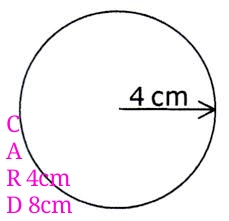
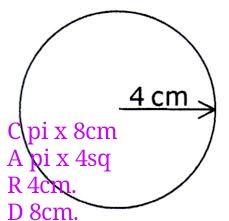
I then come away from the presentation and project some circles onto my board with varying measurements of radius and diameter. I then give the learners the option to go through area first and then circumference. I highlight that in my experience the thing people get wrong in this topic is doing the wrong one in the wrong question. Calculating area when they needed circumference. Or I give the learners the option of my default every time way. They choose my way. Everyone I see a circle I write CARD. We look at this example where we are asked to find the circumference of this circle:


The question gives us 4cm as a radius. We can write into CARD that R is 4cm and D is 8cm. Quickly singing pi r squared sounds like area to me… we can write in that the circumference would be pi x 8 and area would be pi x 4 squared. We then look back to the question and see what it asked us to calculate. In this case it was circumference so we circle that one and work it out. I like this method as it build solid repetition of the skill of recalling and applying the formulae. I also like it as it encourages the learner to reflect and choose is it area or circumference before diving in. 


In my class today the lower level group struggled to start but once CARD had been repeatedly applied they had rapid progression through the tasks. My top end learner decided his way was better and off he went. I always say, I don't care how you get here, just get here if you can. Meaning here is the correct answer! All the learners have access to the answers of all the tasks, they are marking as they go along. Suddenly my top end learner becomes frustrated. He has got most of the work wrong. I take a look and he has done the classic mistake of circumference when it wants area and vice versa. I remind him of CARD he gives it another go and signals to me 5 minutes later that he is being more successful now!


Whilst the learners are working I take 3 of them out one by one for a mini tutorial. They are my 3 at risk learners. I let them know I am putting in interventions for them and say that I believe with hard work they can improve. I am then taken aback realising my peer observers are with me in my final mini tutorial. I am mortified I left my class unattended with peer observers in the room. I apologise and my peers are great and they say, no we think it's brilliant you have taught them well enough to leave them for 5 minutes and these mini tutorials are equally important. I check on the class and they have all done a nice mix of area/circumference including semi circles and compound shapes. I give verbal feedback (should have written more down!) It's almost time for a break but not quite and I am just about to move on when one of the learners makes a safeguarding disclosure to me out of the class so I call a break for 10 minutes while I make notes and report it to my safeguarding lead. I bid farewell to my peers.


I grab 2 minutes to think about what we can do next. I had planned to do angles in parallel lines but I'm concerned that the secure circle knowledge is at risk if I go to angles. My other option is loci or bearings. I decide to go loci. I don't know why I don't teach loci particularly well. Actually it probably ranks as one of my worst lessons. I don't enjoy it and I struggle to visualise the boundaries of areas in the complex questions. Decision has been made now though, I am writing my new learning intentions up on the board before I remember how badly I teach loci!


We do a quick Slido to check our rating now on circles. Everyone has improved. We review the grade 3 and grade 5 learning intentions on loci and constructions and do another Slido, the class has no idea about the language of the topic. No one rates themselves higher than a 1. With a feeling of dread that this has been a poor decision we begin by drawing line and angle bisectors on blank pieces of paper. I demo them in my Slides presentation. (Someone years ago shared a nice demo where the compass moves and the arc appears, I would never have the time to make such a beautiful presentation so I am very grateful to still have it!) Cue difficulties with expanding compass widths in between arcs. Some are unable to keep their pencil in the compass. Some can't use the compass. I get round everyone improving their techniques I see no harm in spinning the paper rather than the compass if the learner struggles. We then take a look at some exam questions. They progress into not explicitly stating it is a line or an angle bisectors but a more worded question. All can do the explicit ones, most can do the more challenging ones. Progress is through skill repetition practise here.


I then put an x on the board (I have been rummaging in my bag for post it notes whilst they were working) and I ask each of them to put a post it note 20cm away from my x. They chat amongst themselves. Some want to do a line, someone twigs it would be a circle, then there's a competition on who can be accurate and exactly 20cm away. I am observing this active learning loving the conversation. I then demo a dog tied to a post would have a circle locus. Then a dog tied to a bar would have a running track shaped locus. (Handily there's a bar outside my window to help visualise) all are keen to get going and for some unknown reason I then decide to demo one of the complex garden planning questions. I draw a rectangle ABCD and ask them where I could put my path that is an equal distance from AB and CD. I start to get clammy I am about to jump in and answer my own question when one of the weaker learners contributes "would it be a line dissector?" We will skip over the incorrect language for now. I check the room and all are thinking the same. Another learner says "yeah this is fine but more than 5m away from the tree for the fountain that isn't any bisect or anything so what do we do there?" I am over joyed. The long phase about the path was because they had twigged that it was a line bisector and were struggling with the next part of the question. I demo an arc 5m from the tree and all are itching to get going. We do a quick Slido and no one rates themselves below a 4!


I circulate the room giving feedback. All have the answers so can tick and flick. I see little merit in me ticking and flicking their work. My role is to shape their learning journey and I do this through feedback not ticks and flicks. I can't believe it, everyone can do it! The lower level ones have some beautiful running track shaped around lines and even a running track around an L shape. The higher level ones are shading the correct regions in the town planning questions. One learner even attempts a create a shipping path question involving 5 elements. I look at the clock and 3.5 hours has gone! I pull them back for a final Slido, it stays the same. I recap our learning intentions and ask them to reflect in their fake iMessage sheets. See my blog post on feedback for these. They all thank me for a brilliant lesson.


I grab a cuppa and sit down to respond to their feedback iMessage sheets. Here are some of the responses:


"Why has no one shown me CARD before? Changed it all now"


"I will forget loci but I won't forget the lesson"


"Thank you it was epic, I learnt more than the last 4 years of studying for my GCSE"


I honestly think this was my best lesson ever. Yes I had pre planned presentations and my photocopying was ready but I made responsive decisions throughout and reflected on learner points. I don't think I did anything special, I certainly would never do anything special for a peer obs, and it all came good in the end. The peer observer emailed me a few weeks later and said she was trying Slido and some other bits she had seen me do, that is why I have an open door policy!


EdPuzzle

I moved into an Ed tech role 2 years ago. I am not an expert in ed tech and actually a lot of my maths lessons are dull and very non techy, I think that’s what makes my colleagues willing to listen to me when I come and show them some new glittery tech. I am acutely aware that time is precious. I am proud that I will only show staff a tech idea if I see a real benefit. It has been very unsuccessful when we have been asked to ‘push’ tech out to staff! I was reflecting on the Google Forms for Feedback using videos and thought, I need to assess them part way through these videos, otherwise we may end up with more misconceptions. I stumbled upon EdPuzzle.


EdPuzzle is fantastic, I am not ‘pushing’ it to you merely telling you the benefits it has given my learners and other staff’s groups. EdPuzzle allows you to insert questions into a video that you can either set as free text or multiple choice. In maths I use it inside Corbett maths videos. When Mr Corbett uses a GCSE question for a second example I will pause the video and insert a question using EdPuzzle. My learners enjoy it. They say it keeps them watching. It reminds them to make notes! I have tried it will my 16-18 learners who enjoy the speediness of it, they like that they have to do something rather than just watching the video. My adult learners, 19+ enjoy it because it gives them time to take in what has happened so far in the video. Here is a quote from a student who is in his late 60’s:

“It is hard to get the video to play but I like that it pauses it, I can think about what has gone before. I can watch some more and enjoy the explanation”


I take the point, it turned out that EdPuzzle when on an Apple iOs device needs the EdPuzzle app downloading rather than watching it in a browser. That part is hard to explain to students (and staff) that some need an app and others don’t. The power of the tool regardless of this initial barrier to accessing the tool makes it worthwhile. Once the learners have watched the video you can get a RAG rated sheet of their marks, timings etc. Evidence of progress over time as they work through tasks. You can lock videos down so that the learners can’t skip until they answer the question. Sometimes I enable this and sometimes I don’t depending on my group.


I knew the power of the tool and was slowly working my way into embedding it naturally in my lessons when I decided to share it with another department. I took it to the English as a second language, ESOL department. I demonstrated it to the staff, my hope was that the staff would see the benefit to them that their learners could listen to the English spoken language and then answer questions based on what they had heard. I was right, they loved it. One teacher took it to heart, it instantly became her go to method for assessing topics. She insisted on using her own videos rather than inserting questions into existing You Tube videos as I had been doing. The level of effort she put into this cannot be underestimated. 


What transpired was a brilliant display of dedication and commitment by this teacher to her ESOL learners. They could watch a video on their phone as they're were waiting for a bus and practise the language that they needed for the journey. The teacher had evidence of progress over time using the tracking produced by EdPuzzle. She could show starting points, hours spent learning and improvement in the quiz scores. In my lessons my learners felt that it brought Corbett maths to life. As brilliant as Hegarty maths is, the students appreciated a different voice and a different method of assessment. As I set it to multiple choice in the Corbettmaths videos, I didn't need to mark the work. I used misconceptions for my incorrect answers. See my post on misconceptions in my Google Forms blog. Then the video progressed and Mr Corbett answered the question in much more detail than I ever would so if the learners had misunderstood or made a mistake they could identify where they had gone wrong. Finally to end I would I sent another multiple choice question with an image of a GCSE exam question to see if there had been any progress. It looks a little like this: 


The video pauses before the second example by Mr Corbett. I have used the incorrect angle fact of angles on a straight line add up to 180o to give the incorrect options of 85 and 100 degrees. I have also listed 45o as an incorrect option to diagnose the misconception of opposite angles being equal applying here. The video then resumes after the learners answer the question and Mr Corbett goes through in great detail how and why the correct answer is 140o. I really like this as an independent learning assessment tool. I am all for something that gives learners independence, stretches them, reduces my workload and evidences progress, I think EdPuzzle is a great tool that hits this brief!


Retrieval Practice

I love to read, and I read widely around education, teaching. Maths, anything that interests me. However, no matter how much I love to read the amount of time I am able to spend reading is significantly less than I would like it to be. Prior to my current position, unfortunately the only real time I devoted to reading was when there was an urgent need. I was preparing for interview for my previous position I was trying to find some research that was relevant to what I was discussing in my presentation. 


I know this is the wrong way round to do things the research should have informed what I was doing beforehand but we were where we were and the interview was in 2 days. I am pleased that I now allocate myself coffee and reading time once a week to keep up with the latest blogs and developments. I love my coffee and reading time and it is sacred, I need it to be so. That doesn’t mean that if work is busy and I don’t get time to read at work I will make time to sit at home with a coffee and read, point is I read weekly! Whilst preparing for my  interview I came across retrieval practice. Retrieval practice had nothing to do with what I was presenting in interview but it instantly sparked my interest. 


I ended up spending all my interview talking about retrieval practice and openly admitted that I haven't used it yet because I just found it but since I got the job and have begun using retrieval practice. I am not an expert but am happy to signpost you to the experts here: https://www.retrievalpractice.org/

Retrieval practice works on the basis that if you regularly retrieve small bits of information you will deepen your understanding. It was really nice to finally find something that was current, relevant to my teaching and unusually appropriate to a maths lesson. Too many times as a maths teacher I have felt left behind. Whilst other subjects make huge strides in questioning and feedback I find myself trying my hardest to make it work in maths but most of the time answers are right or wrong. The guys at https://www.retrievalpractice.org/ shared a retrieval practice grid where the topics that have been covered previously were colour-coded by how far in the past they had been. This was easily replicated into my lessons and it looks a little bit like this. 


Share £60 in the ratio 7:5

Find the nth term of this sequence:

32, 26, 20, 14, 8

Simplify:

f + f -f +2f -2f + e

Multiply:


5.4 x 3.2

What is the 100th term of the sequence 5n-6?

Tickets cost £3.50, we need 18 tickets in total. 

Calculate the total cost.

Share £125 in the ratio 18:7

Simplify:

d x d x d

Simplify:

2k - 3g + 5g + 4k

The next term in a sequence is 15. The start number is 9. What is the nth term rule?

Multiply: 

2.5 x 1.2

Aliaa and Steve share £45 in the ratio 5:4. How much do they each get?

Multiply:

4.4 x 3.2

Gray and Teag share some money in the ratio 2:3. Teag gets £45. How much was the total amount shared?

Simplify:

e x j x j x e x e

Is the term 54 in the sequence 6n-6?


Red is 4 lessons ago, orange is 3 lessons ago, green is 2 lessons ago and blue is last lesson. This replaced my bellwork. Students arrive and these are on their desks already they sit down and begin working through the grid. Every lesson I would change the questions and colours. It really wasn’t an onerous task. The aim of it being a little reminder a little refresher and in total would take less than 5 minutes to go through the board. So I would give the learner's 5 minutes to come in and do it and then 5 minutes to run through at the board I felt that it was worth the sacrifice in my lesson time but I appreciate not everyone has 90 minute lessons like we have. (We only have 1 90 minute lesson a week though!)


My adult resit learners would sit and discuss the questions. You would overhear questions about when to use ADAM or DINO. I would spend the 5 minutes catching up with any absentees from the previous week or any messages that I needed to pass on to my learners. The next time when I would look up the powerful maths discussions that were taking place were jaw dropping. The collaboration and cooperation of learners in reminding and refreshing each other with how to answer the questions was lovely to see. Age gaps disappeared and mature adult learners were working at the same pace and stage collaboratively with teenage adult learners. Over time our little routine expanded into each table being responsible for sharing the answers rather than me standing at the board. My application of the grids also evolved in that the red section became a place for poorly answered topics to be repeated and recovered. For example nth term would be in the red section for one class for a few weeks whereas for another class it was factorising. Using these grids I was able to personalise the retrieval practice that each group needed.


Having taught resit groups for a number of years the impact in my results was significant. The topics that have been regularly and consistently answered correctly on my retrieval practice grids were regularly and consistently answered correctly in my mock exam papers. It was evident that those 5 minutes made all the difference in keeping topics ticking over. When we came to the actual exam one learner asked me for a copy of all the previous retrieval practice grids to revise from. This was a Eureka moment. Thanks to Google Docs I had a bank of sheets that I could print off and issue meaning we had instant revision packs ready to go! Google docs is brilliant for this because it has version history allowing you to revert to previous versions. If you would like to know more about Google docs I will talk about this at a later date. 


Not only did retrieval practice improve my in class testing, it helped create an empowering collaborative working environment which was an outcome I wasn’t expecting. It also enabled me to have a class specific time relevant revision pack for learners appropriate to their stage and ability. I am a big fan of curating revision collections for my learners based on the topics and how well they have done in them. Retrieval practice did this for me! 


Why do we count in 4s?

 Why do we count in 4s in England? As a former maths teacher who chose to work in #FEmaths I think we may need to look at assessment at age ...